An Apple TV turns your living room into a decent home gym: the big screen is easy to follow from the floor, and the sound fills the room. You need a clear patch of floor about two metres square, a workout app on the TV, and optionally an Apple Watch for your heart rate. Here's how to set it up, which apps to use, and how to get the most from it.
Why work out with your TV
A phone propped against a skirting board is hard to read when you're mid-plank on the other side of the room. A TV fixes that: you can see the timer, the next exercise and how to do it from anywhere in the room, and you hear the coaching without headphones. It's also private. Your living room is the one place nobody's watching you do your first set of lunges.
Set up your space
- Clear about two metres by two metres in front of the TV, enough to lie down with your arms over your head and to step out into a side lunge. Move the coffee table rather than working around it.
- Face the screen side-on when you need to. For planks and push-ups, set up with your head towards the TV, or turn sideways, so you can glance up without straining your neck.
- Put down a mat or rug for floor exercises, and keep a towel and water within reach.
- Turn the volume up a little higher than usual. You'll be breathing hard and further from the speakers.
- Keep the remote in reach, on the floor by your mat, so you can pause without getting up.
What you can use
There are a few good ways to work out on an Apple TV:
- Apple Fitness+ plays video classes on your Apple TV, and shows metrics from your Apple Watch on screen. It's a subscription, US$9.99 a month or US$79.99 a year in the US, and you connect an iPhone or Apple Watch to the TV to use it. Our guide to Fitness+ alternatives without a monthly fee compares it with other options.
- YouTube has thousands of free workout videos, though they come with ads, and nothing records your workout unless you start one on your watch.
- Workout apps from the App Store on the TV. Search the App Store on your Apple TV. Fewer fitness apps have a TV version than an iPhone one, so it's worth checking before you buy.
Tips for a better TV workout
- Warm up before you start. A couple of minutes of marching on the spot and arm circles while the app loads is enough.
- Learn the move, then look away. Glance at the screen at the start of each exercise, then focus on your form rather than watching the whole time.
- Make it a fixed time. The TV is already part of your evening, so a workout before the first show of the night is an easy habit to attach to.
- Mind the neighbours. Living rooms often sit above someone else's. Our guide to quiet, no-jump workouts has exercises that won't shake the floor.
Streaks Workout on Apple TV
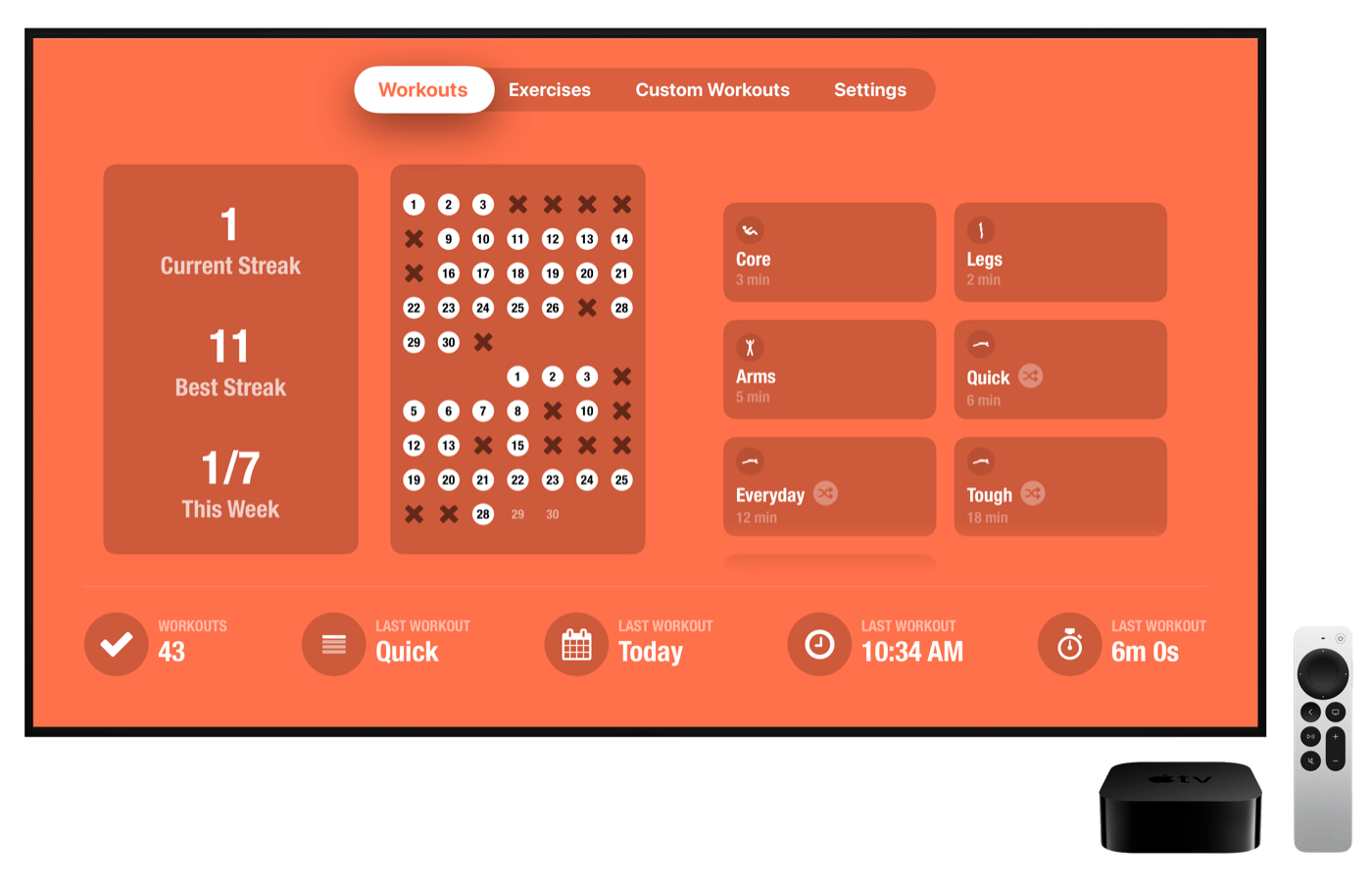
Streaks Workout has its own Apple TV app. It's the same app as on your iPhone and iPad: on your Apple TV, search the App Store for "Streaks Workout". Everything syncs through iCloud, so your workouts, history and custom exercises are the same on every device.
On the TV you can:
- Do any workout: the built-in workouts of about 6, 12, 18 or 30 minutes, your own custom workouts, and Workout Packs. Packs you've bought on your iPhone are ready on the TV too, and you can also buy them there.
- Follow the voice coaching, which also appears on screen, with each exercise shown big enough to follow from the floor.
- Play Apple Music during your workout, with an Apple Music subscription.
- See your streak and calendar on the home screen, and your full workout history.
- Build workouts and exercises right on the TV, as well as on your iPhone or iPad.
- Set up profiles for up to four people in your home.
The Siri Remote runs the workout: press Play/Pause to pause or carry on, click the touch surface to move to the next exercise, and press Back to end the workout. Leaving the app pauses the workout.
Heart rate with an Apple Watch
The TV app doesn't show your heart rate on screen. If you wear an Apple Watch with Streaks Workout on it, the watch records your heart rate and energy while you work out on the TV. It can start automatically when a workout begins on the TV, or you can start it on the watch with Track Workout. Your heart rate shows on your wrist, and the workout is saved to Apple Health with your heart rate and energy once it syncs to your iPhone.
More guides
Bodyweight workouts on your Apple TV, iPhone, iPad and Apple Watch, all in sync. A one-time purchase, with no subscription.